Boosting User Order Rate by 100% with Unit of Measurement (UoM) Conversion
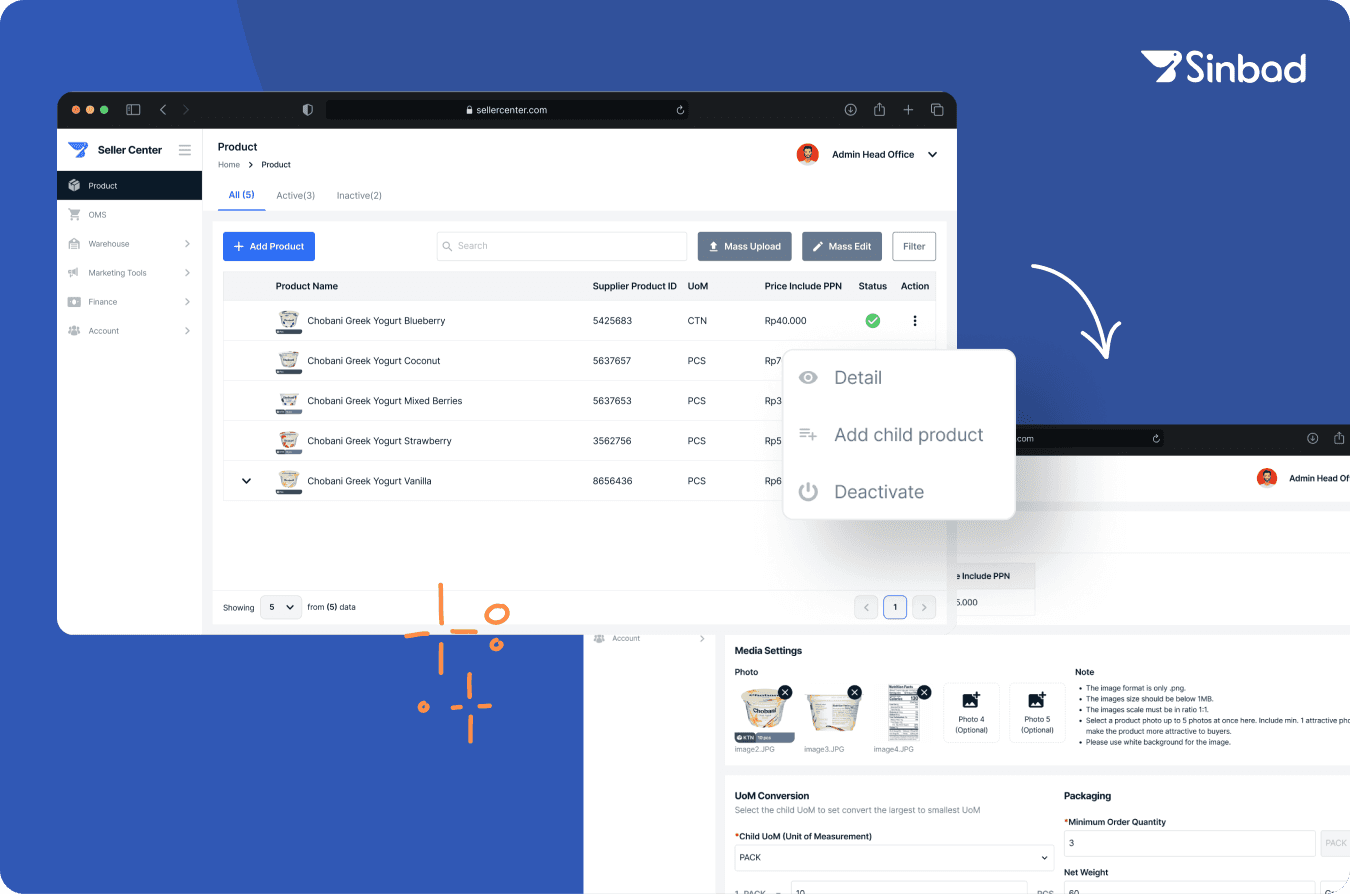
A feature that allows multiple units of measurement (UoM) for a single product, providing more flexible purchasing options and boosting sales for slow-moving products. This project focused on implementing UoM conversion functionality within the Seller Center.
Product Designer
Sinbad Seller Center
Sinbad
2024
Background
In Q4 2023, Sinbad expanded its offerings to provide non-food products. However, after the launch, we observed a low order volume for these items. As a result, unsold stock started piling up in warehouses. Our main goal was to boost the order rate for non-food products by making them more accessible to users, avoiding inefficiencies and waste.
🔍 Diving into the Issues
After team up with PM and stakeholders to discuss the problems, it became clear that using a single, large UoM was a big issue, particularly for General Trading stores (Toko Kelontong). The high price of non-food products in cartons made it difficult for users to make purchases, leading to a significant buildup of unsold stock (black stock).
👩🏻🌾
User Pain Point
Many users from General Trading had trouble buying large UoMs for non-food product because they couldn’t afford the higher prices for cartons.
🏭
Black Stock Accumulation
The unsold products are piling up as black stock in all of Sinbad's warehouses. In the long run, this will negatively impact revenue and lead to insufficient storage space.
🧑🏻💻
Limited Admin Resource
Only one admin was responsible for managing all product data, which became increasingly stressful as the number of products grew and prices frequently changed.
We realized our current approach wasn't meeting user needs yet. That’s when we kicked off a broader collaboration, and ultimately decided to offer products in smaller units of measurement (UoMs).
Diving Deep: Examining Our Existing Data
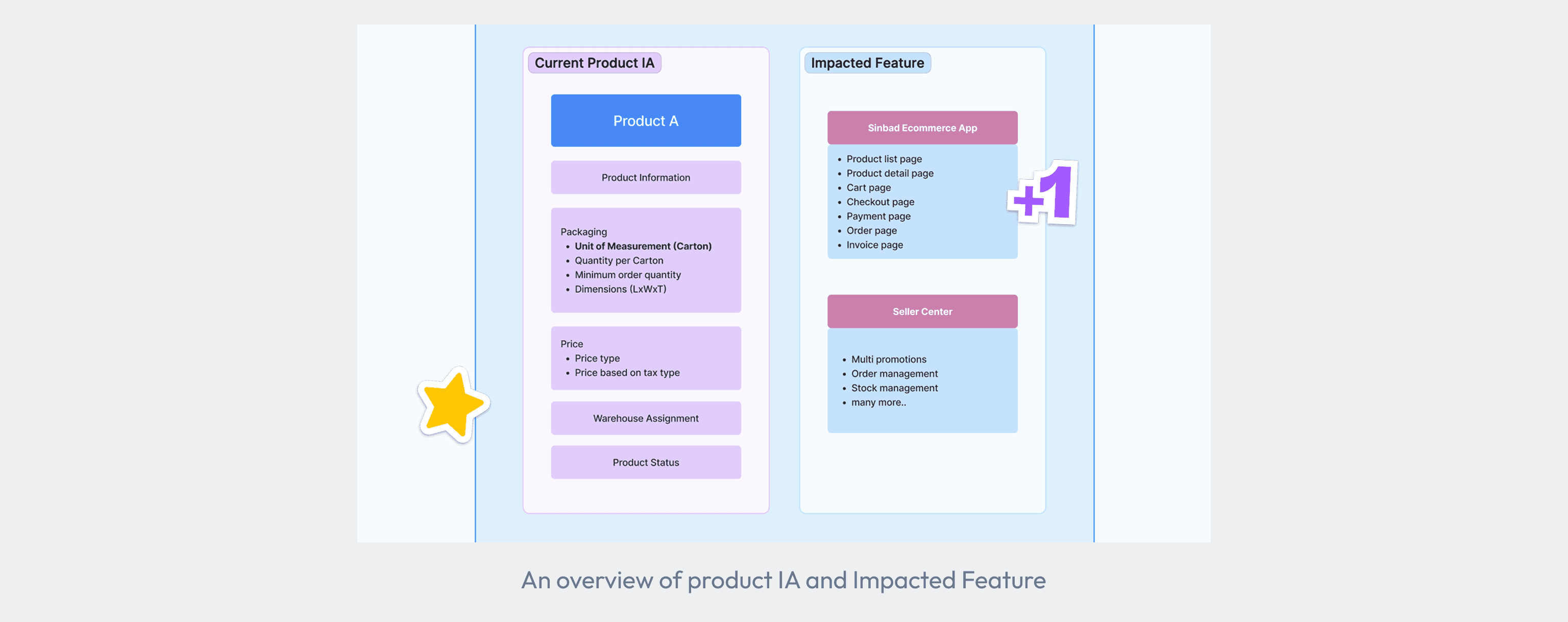
Product data plays a crucial role in Sinbad's operations, and changing the UoM structure could potentially affect multiple systems. To fully understand these effects, I broke down the existing product information architecture (IA) in Seller Center and assessed how changes to the product data would impact the system.
Mapping out Crossed Platform Integration
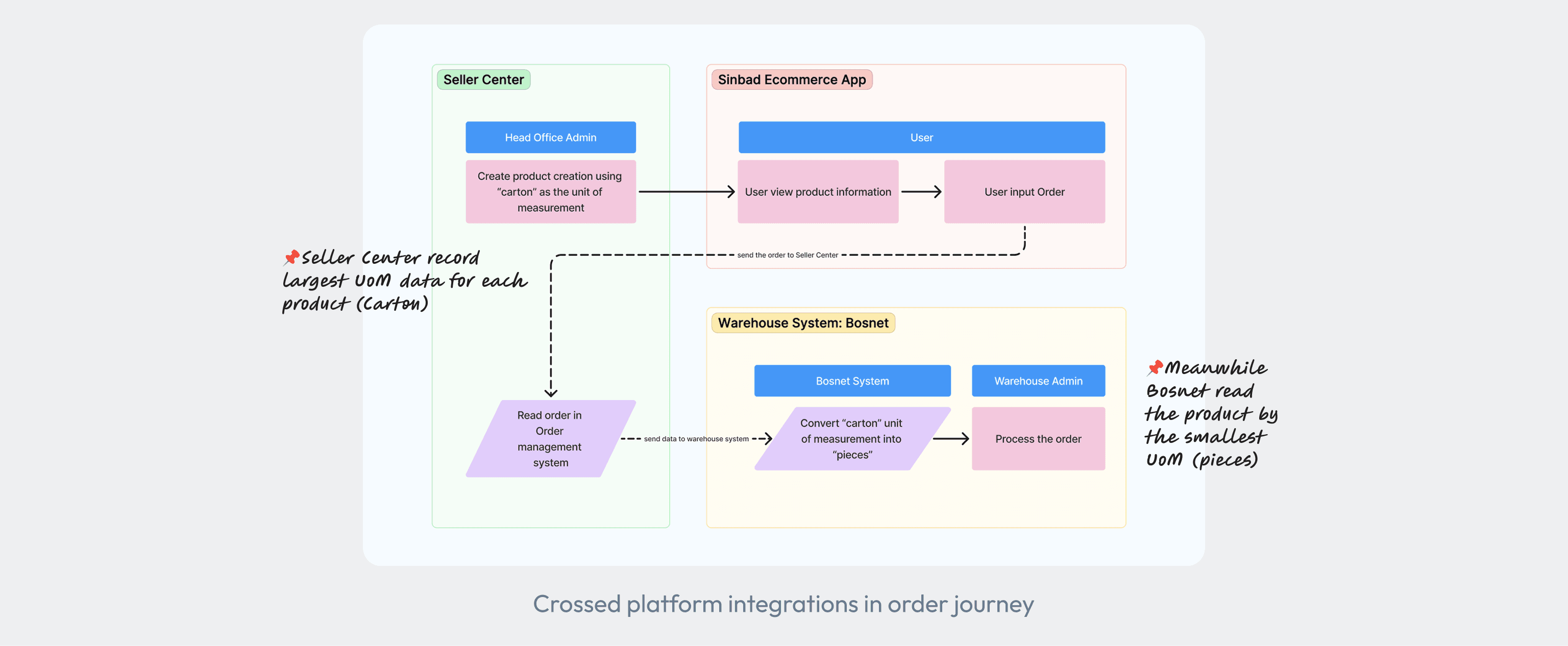
Seller Center, however, is just one piece of the puzzle. For the whole order process to run smoothly, it must integrate with the Sinbad e-commerce app and Bosnet, our warehouse system. I mapped out how these platforms connect and discovered a key issue:
🔎 Seller Center tracks products in the largest UoM, while Bosnet uses the smallest. Since Bosnet is an external system, making changes on it wasn’t the right option.
🎯 Setting Up The Goals
📦
Introduce multiple UoMs to provide flexibility for users, enabling them to purchase smaller quantities and helping to boost the order volume.
🔄
Ensure smooth integration of multiple UoMs across Seller Center, Bosnet, and the Sinbad e-commerce app without disrupting operations.
👨🏽💻
Minimize admin workload by ensuring the new feature don’t overcomplicate product data management.
🏃🏻♂️
Implement the solution efficiently within a limited number of sprints, balancing development resources and timelines.
Now that we’ve narrowed down our goals and scope, the big question is:
“How might we introduce multiple units of measurement (UoMs) to enhance user flexibility and ensuring seamless integration across platforms?"
Project Roadmap🏃🏻♂️
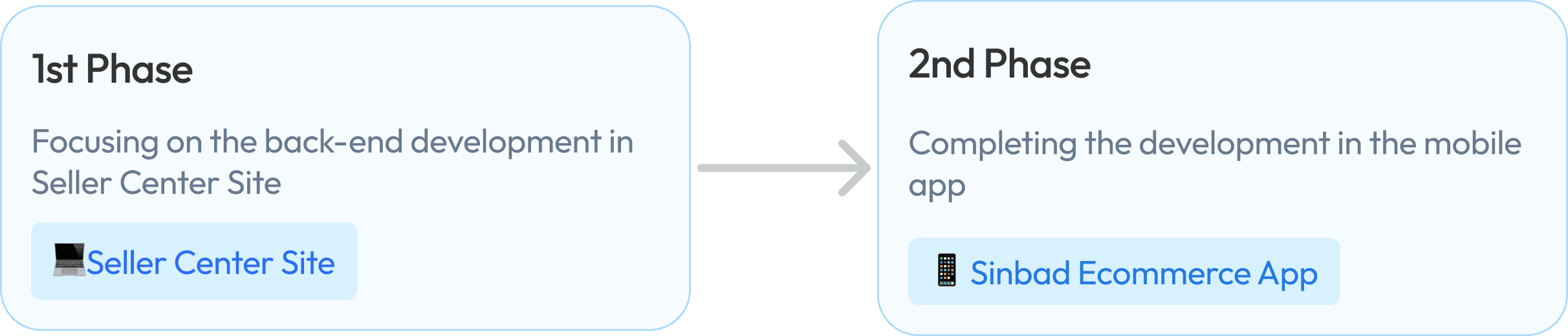
💬 Understanding that the UoM conversion would have a significant impact and consume a significant portion of the sprint, we prioritized cohesive planning. In the initial phase, we focused on developing the Seller Center to address its unique needs first. While the UoM conversion solution was also designed for the Sinbad Ecommerce app, this case study will focus solely on the design process for the Seller Center.
🧩 Solving with Creativity: Finding the Right Possibility for Multiple UoM
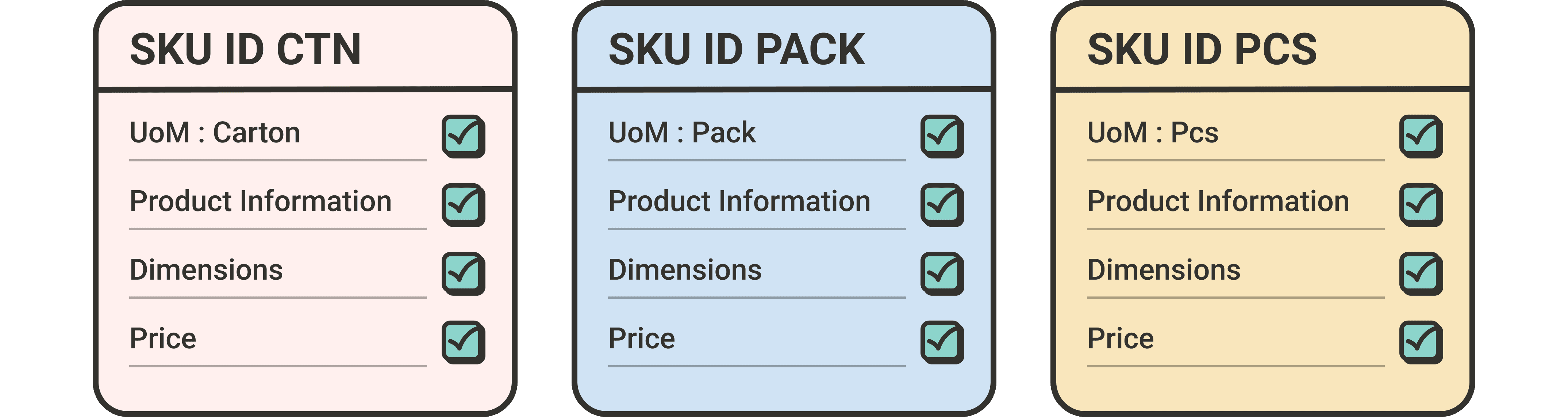
At first, we considered adding new SKUs for each UoM as a quick fix. However, as we discussed it, we realized this would drastically increase our SKU count and overwhelm the admin. It was frustrating to see what seemed like a good idea quickly become unworkable.
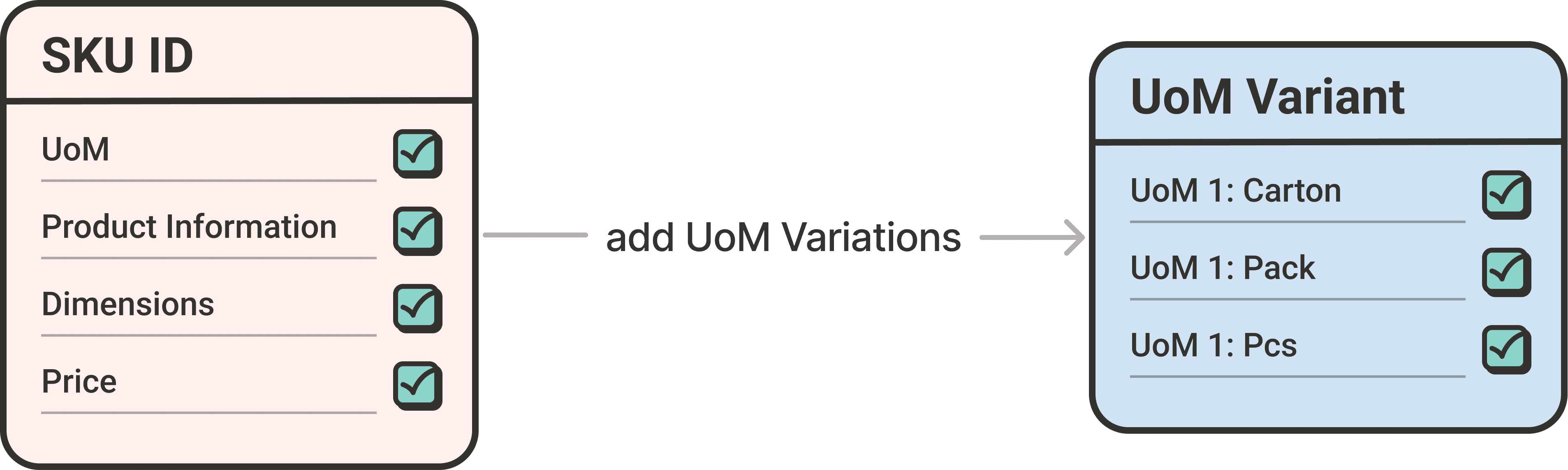
Next, we explored the idea of using variants—incorporating multiple UoMs within a single SKU. This solution seemed to have potential but soon became clear that it led to longer, more time-consuming sprints.
With all the ideas in mind, I explore the concepts by sketching five low-fidelity designs to evaluate their pros and cons, aiming to find the best method for implementing multiple UoM.
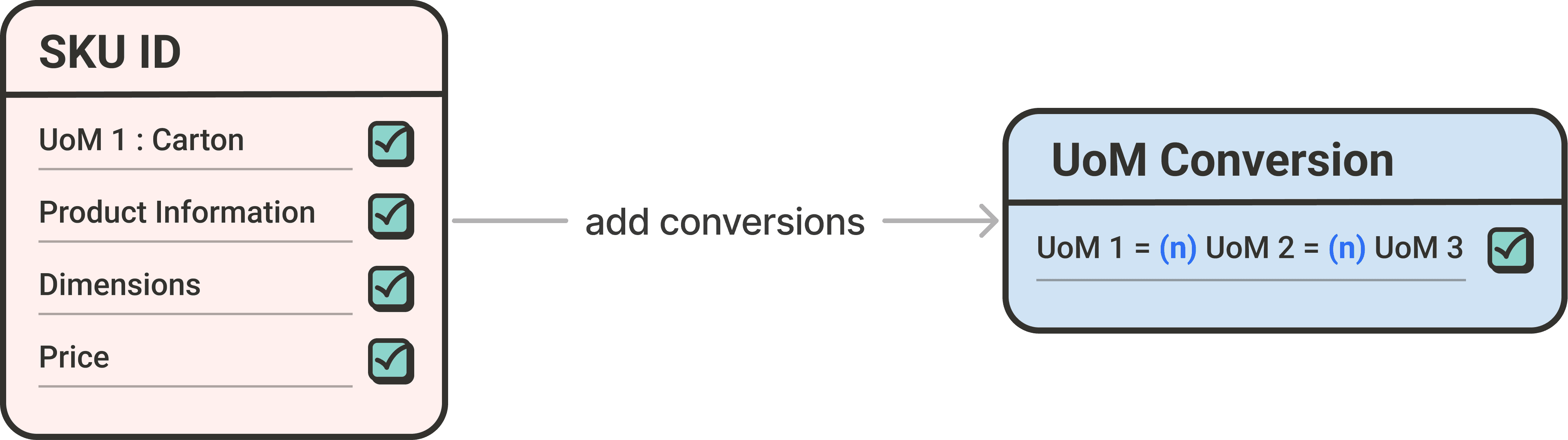
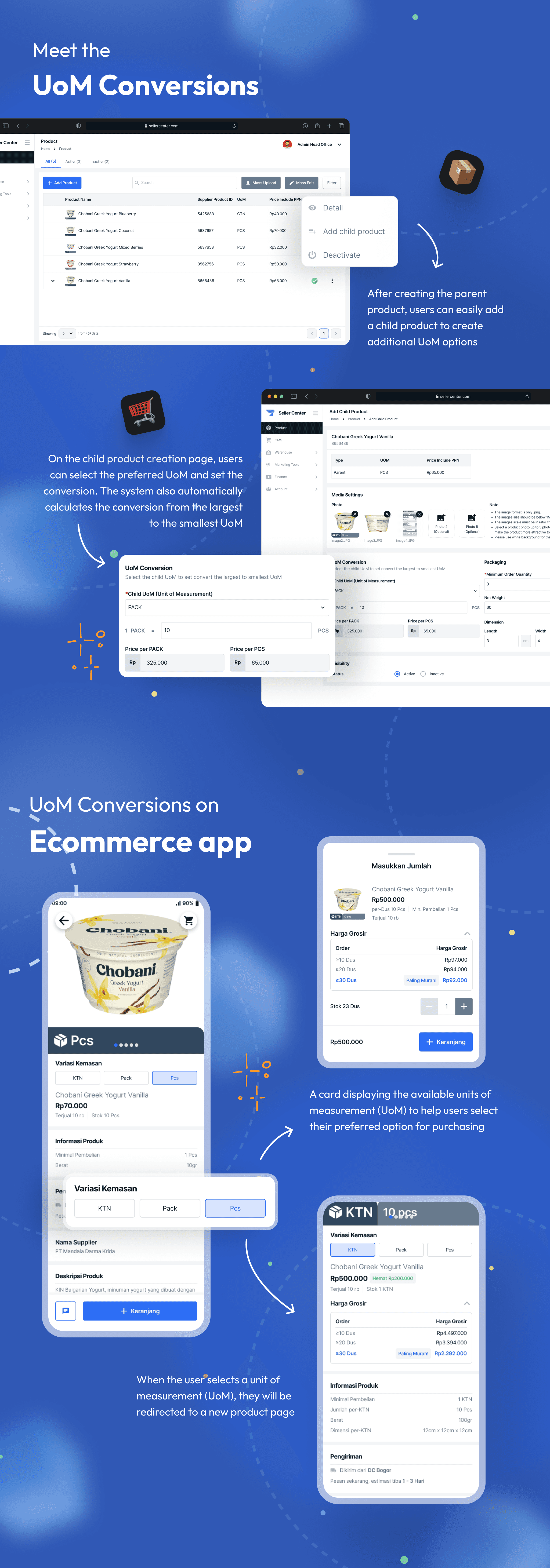
Finally, we discovered the "UoM conversion" model, inspired by currency exchange rates. This clever solution let us manage stock across different UoMs (CTN, PACK, PCS) as if they were all one big inventory. It was a real “aha” moment—this approach fit perfectly with Bosnet’s limits and met our goals. We could finally see a light at the end of the tunnel!
⚠️ Preventing the SKU Duplication
Moving forward with the "UoM Conversion" concept and remembering our goal—to support multiple UoMs without increasing the number of SKUs in our database—we explored various ideas and feedback. Ultimately, we decided on the “parent & child” approach.
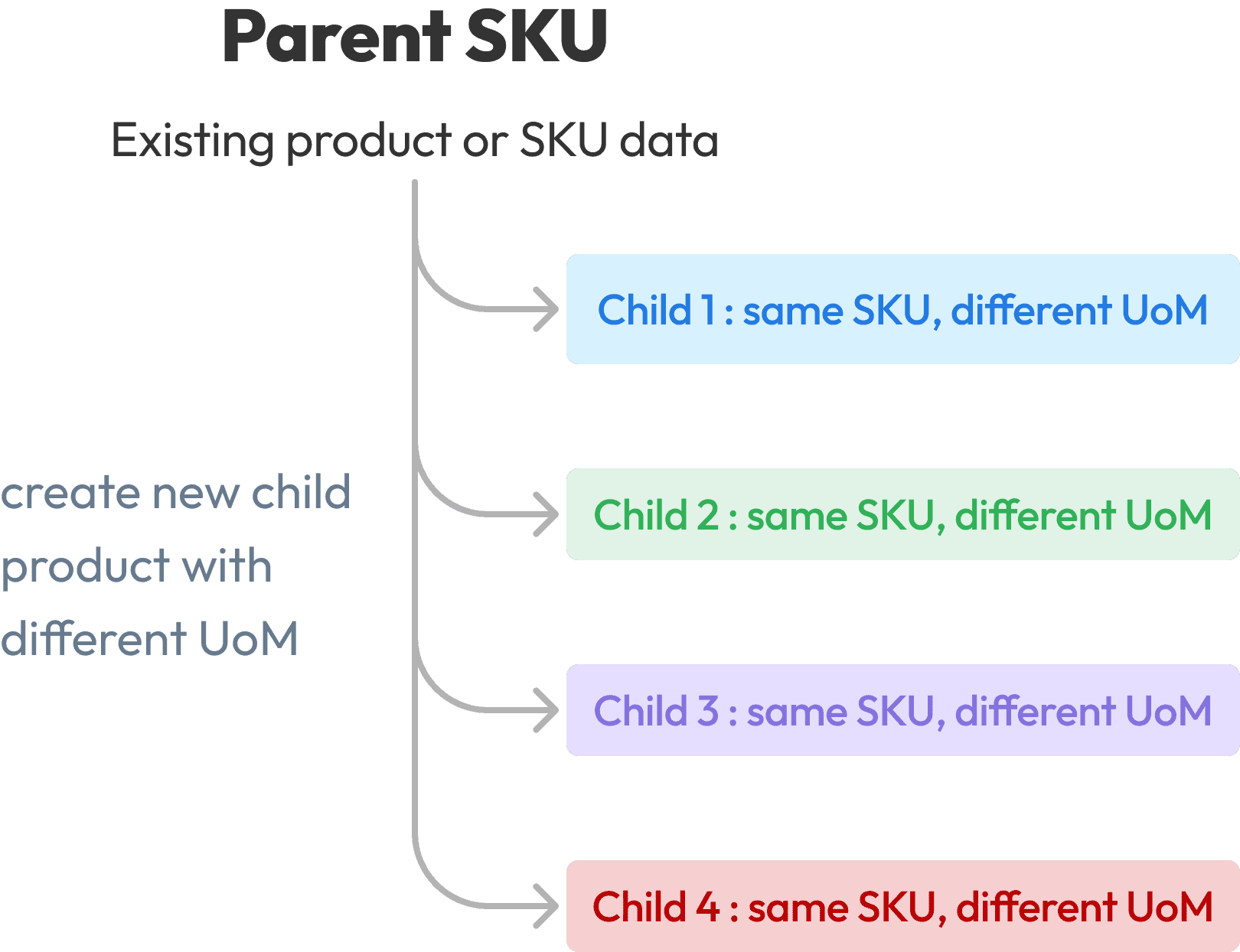
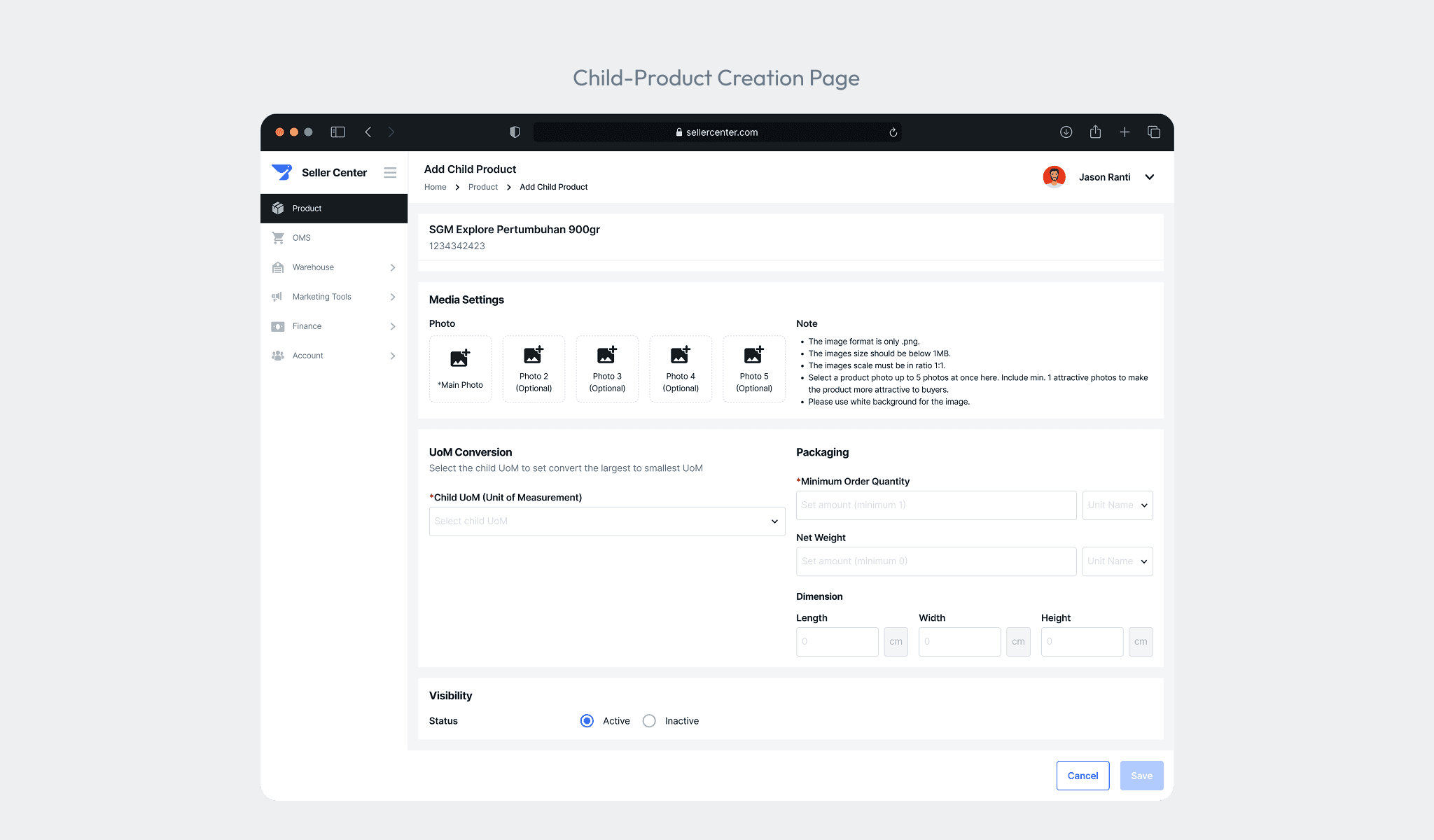
This allows us to create a child product for an existing parent product, where the child inherits most of the parent product details but can have its own UoM, images, price, and dimensions. This meant we didn’t need to change the existing parent product creation process, allowing us to focus solely on designing the child-product creation.

✍🏻 The Final Touch: Completing Design Scenarios and Flow
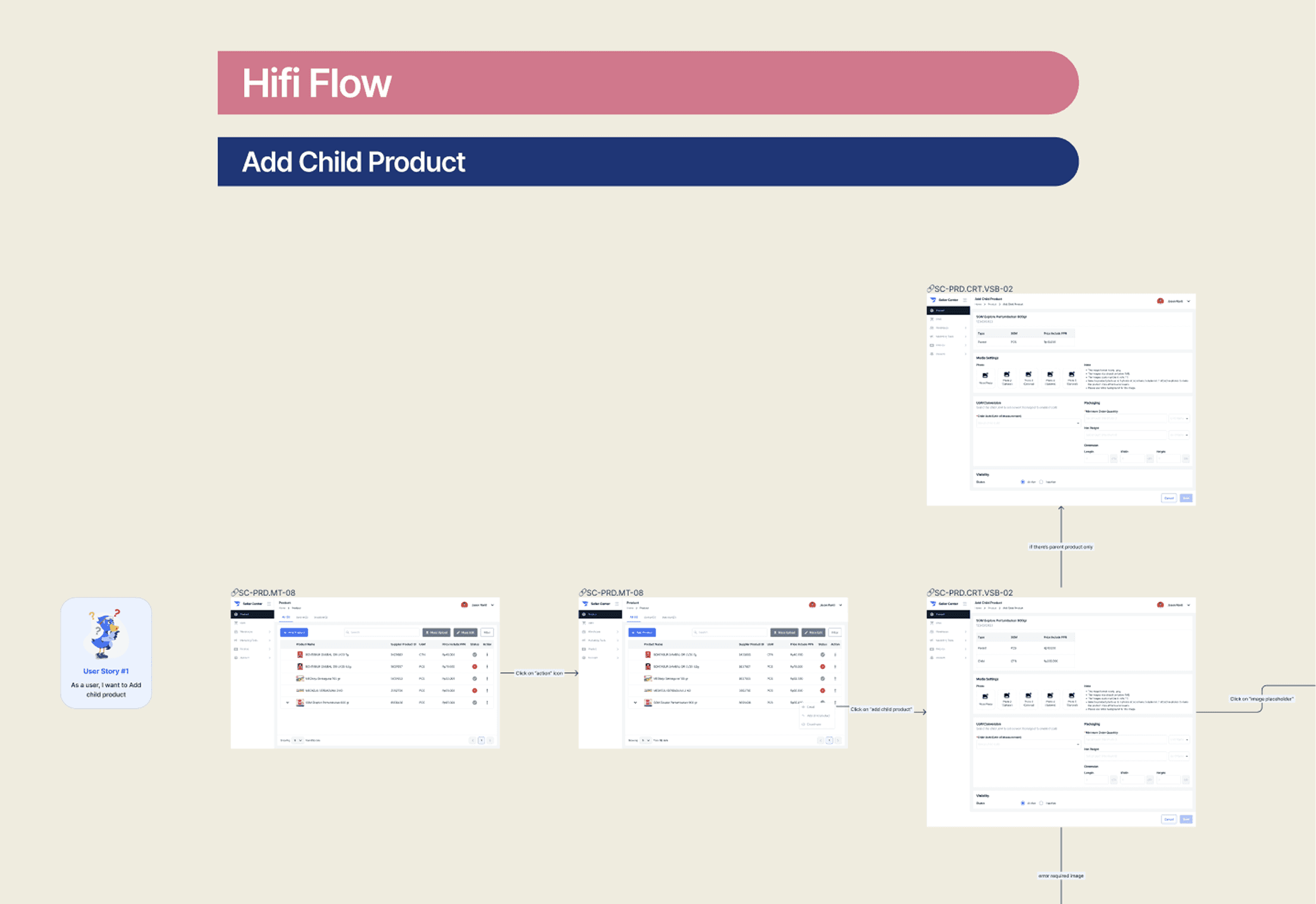
With the concept nailed down, I quickly put together the full design for UoM Conversion—from creation to edit pages (thanks to our design system for making the design process more efficient!)🚀
User Scenarios:
Add child product
View detail and Edit child product
Deactivate parent product
Validation when parent product is edited
View detail after parent product is edited
🔍 Validating the Essentials: Testing Critical User Stories
To ensure a seamless product creation process, I conducted usability testing on the Child Product Creation page. The test focused on efficiency and ease of use, revealing key insights:
🔁 Feedback Frenzy: Iterating for Success
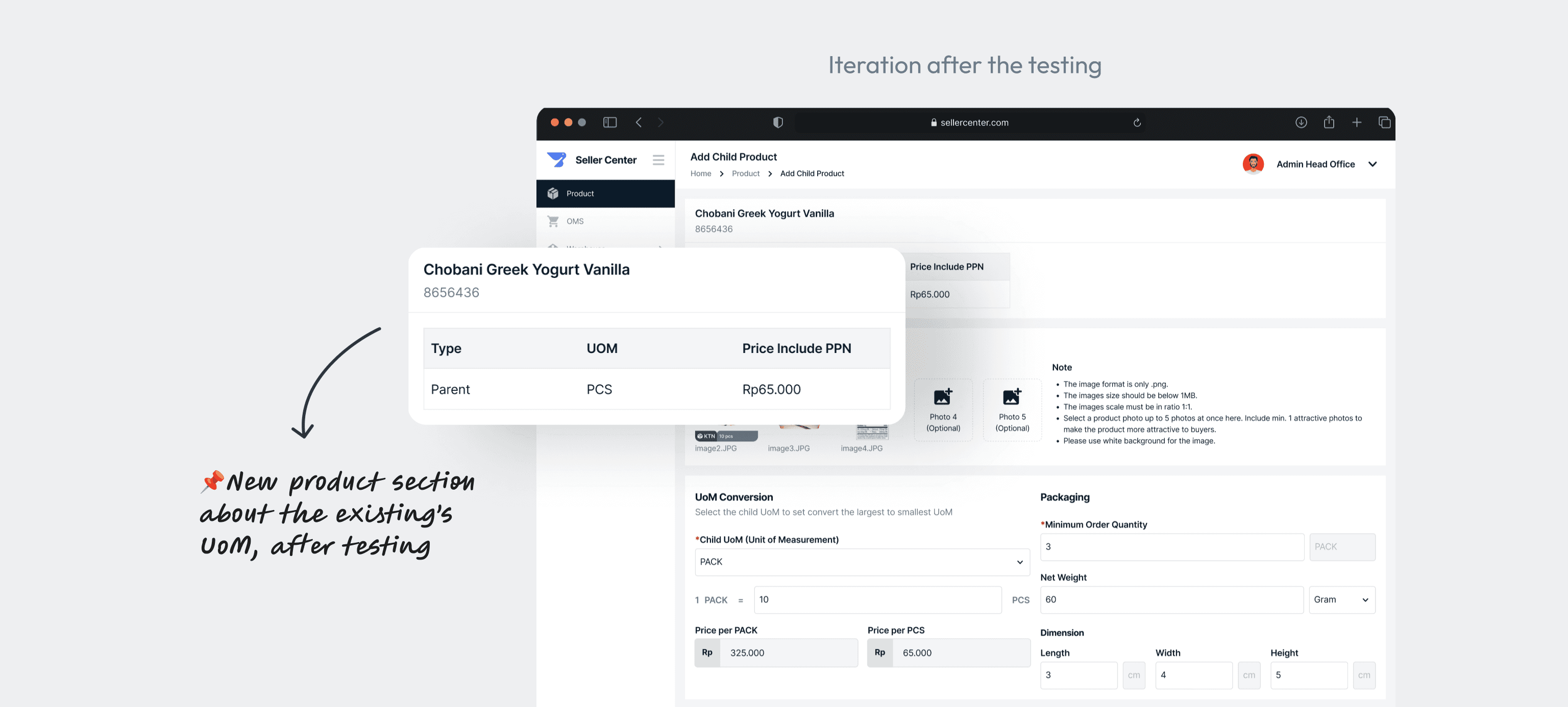
After countless iterations, I refined the child-product creation page by incorporating the existing UoM information for the selected product. This improvement eliminated confusion on the creation page and made it easier for admins to review and verify data before submission—bringing the task completion time down to just 56 seconds! 🎉
Impact: A Game-Changing Boost in Efficiency and Orders✨
Thanks to the UoM conversion feature, we completed the Seller Center development in just one sprint, and adding a new child UoM now takes less than a minute! 🚀 But the real game-changer? Our order rate from general trading users doubled—growing by 100% within a month of launch! This simple yet powerful enhancement transformed a major pain point into a seamless, efficient experience for our users. 🎉
🚀 100%
Order Rate
⏱️ 56s
Task Completion
🏃🏻1
Sprint completion
👀 What I Discovered on This Design Adventure
Iterations is Key
Regardless of the project’s complexity, iteration is crucial to finding the most effective solutions. After countless iterations, there's nothing more satisfying than finally seeing the right solution come to life. It makes all the effort worthwhile!
The Power of Collaboration
Strong collaboration is essential for a smooth design process. Involving stakeholders early and collaborating closely with the PM made a huge difference! I can only imagine the challenges I would have faced if I hadn’t brought the team into the discussion from the start.
Understanding System Thinking
I’m all about seeing the big picture! Digging deeper helps me integrate design components seamlessly. Systems thinking is key to understanding how each feature affects the whole product, and it helps me catch friction points early for a smoother experience.